26 KiB
ASSESSOR onboarding guide
A guided tour for new colleagues: what ASSESSOR does, how a scan report travels through it, how the Core and the engines fit together, and which data you may use for which kind of feature, including AI workflows.
This guide explains concepts. For setup commands, deployment and configuration
read PROJECT_OVERVIEW.md. For binding rules read
AGENTS.md. Where this guide and a binding document disagree,
the binding document wins.
Contents
- What ASSESSOR is
- Vocabulary you will hear every day
- A typical assessment in the application
- From scan report to stored finding
- GPO backups: a path of their own
- Evaluation: verdicts, scores, security domains
- The Core Engine and the optional engines
- Which data can be used where
- AI workflows
- Building a new feature: a decision checklist
- Your first day in the code
- Where to read next
1. What ASSESSOR is
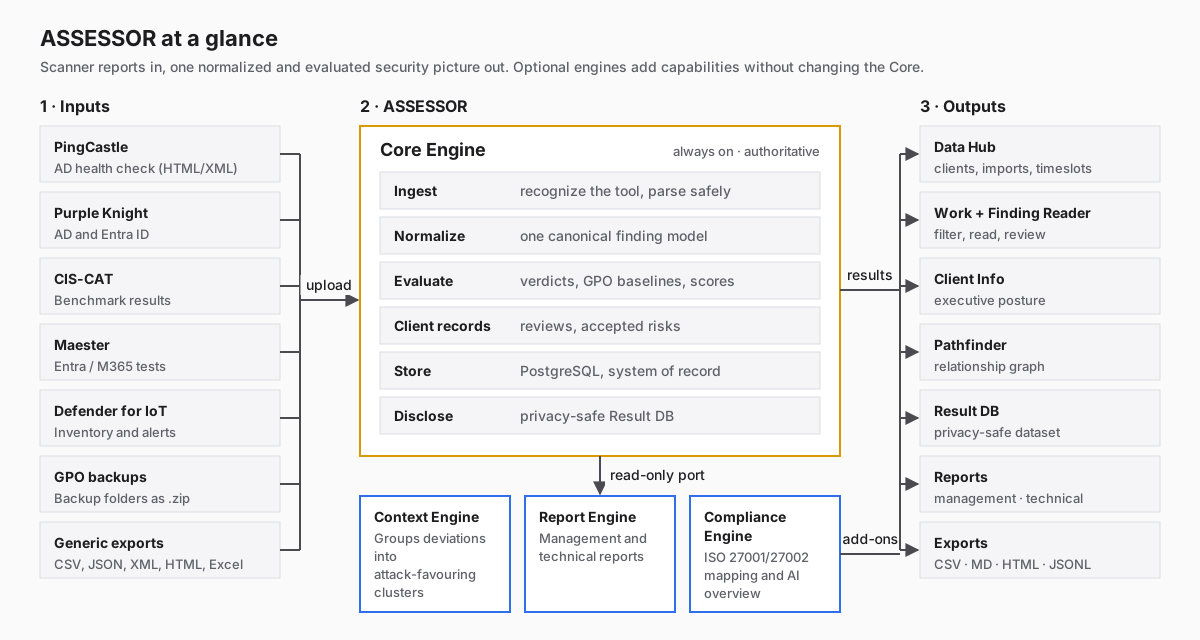
Security consultants run several scanners against a client environment, such as PingCastle, Purple Knight, CIS-CAT, Maester and Defender for IoT, and collect Group Policy (GPO) backups. Each tool writes its own report format, uses its own words for "failed" or "critical", and scores differently.
ASSESSOR takes those reports and:
- imports them safely, whatever the format (HTML, XML, JSON, CSV, Excel, GPO backup folders),
- normalizes every result into one canonical finding model and keeps the original values next to the normalized ones,
- evaluates them: verdicts, GPO baseline comparison, scores and security domains,
- stores everything in PostgreSQL with full provenance (which file, which table, which row),
- presents the result to the analyst (Work, Finding Reader, Pathfinder) and to management (Client Info, reports),
- discloses a privacy-safe version, the Result DB, that may leave the client context.
Optional engines add capabilities on top: context clusters, reports and regulatory (ISO) mapping with AI. They read the Core's results and never change them.
What ASSESSOR is not: it does not scan anything itself, it does not change a verdict a scanner reported, and it never claims effective device state from a GPO backup.
2. Vocabulary you will hear every day
| Term | Meaning |
|---|---|
| Client (code: project) | One customer. Created in Data Hub. |
| Timeslot (code: assessment) | One assessment period of a client. Holds the scan runs of that period. |
| Scan run | One confirmed import of one or more report files from one tool. |
| Finding definition / occurrence | The definition is the stable identity of a check (tool + rule). An occurrence is that check showing up in one scan run. |
| Original vs. normalized value | Every mapped value keeps the source value (originalValue) beside ASSESSOR's normalized value. Originals are never overwritten. |
| Provenance | Every value knows its import file, source table, row/column or object path. |
| Scanner profile | Tool-specific knowledge (field mapping, status/severity vocabulary, native score, first-read fields) in src/profiles/<tool>/. |
| Deviation | A failed check, shown with the Deviation status in Work. The default Work filter. |
| Verdict | ASSESSOR's authoritative evaluation of a GPO setting (see section 5). |
| Review / risk acceptance | Client-owned work state. Stored separately and kept across reimports. |
| Result DB | The stored, privacy-checked projection of all results. The only dataset that may be shared or fed to AI. |
| Core / Core area | Everything ASSESSOR does today. It is split into areas such as Ingest or Evaluation. Changing an area needs explicit consent (section 7). |
| Engine | An optional capability that reads the Core and never writes to it: Context, Report, Compliance. |
| Extension point | A place in a Core view where an engine shows its content, for example the Finding Reader Context section. |
3. A typical assessment in the application
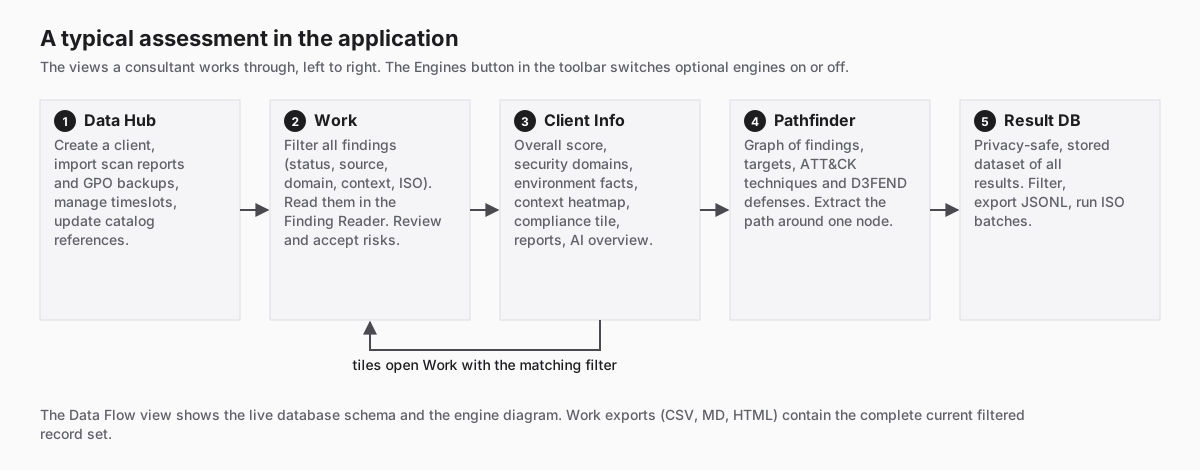
| View | What you do there |
|---|---|
| Data Hub | Create and select a client, import scan reports and GPO backups, manage timeslots, update ATT&CK/D3FEND catalog references, upload the ISO corpus. Its six donuts summarize the selected client's results. |
| Data Flow | The live database schema (tables, columns, relationships) and the interactive engine diagram Engines & relationships. Available without a selected client. |
| Work | The analyst workbench: the list of all findings with facet filters (status, source, category, security domain, context cluster, ISO control and theme), the Finding Reader (first a Problem and a Next step, then background and evidence), reviews, risk acceptance and CSV/MD/HTML exports of the current filtered set. |
| Client Info | The executive picture: overall score, security domains, environment facts, context heatmap, the compliance tile, reports and the AI overview. Almost every tile opens Work with the matching filter. |
| Pathfinder | A graph of findings, targets, ATT&CK techniques/tactics, D3FEND defenses and context clusters. Extract Path isolates one node and its neighbours. |
| Result DB | The privacy-safe, stored dataset of all results: filter, inspect the redaction trace of a row, export JSONL, start ISO mapping batches, Export JSON of the AI input. |
The blue Engines button in the toolbar switches the optional engines on or off for you. The Core is always on.
4. From scan report to stored finding
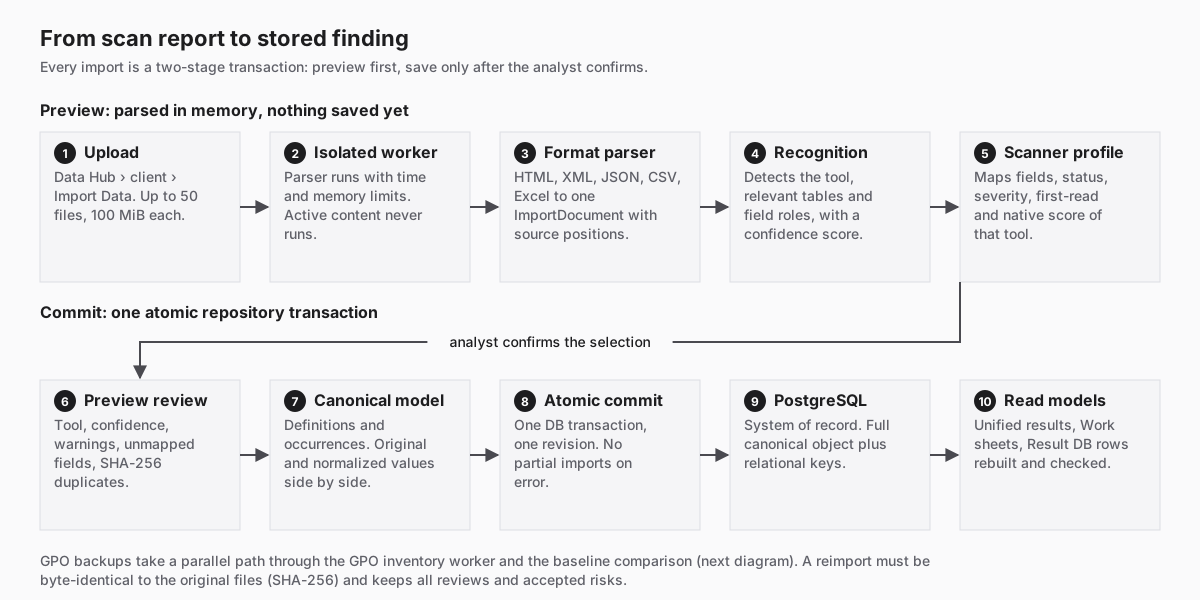
An import always has two stages. Nothing is saved until the analyst confirms.
Preview (in memory).
- Upload. In Data Hub, inside a client,
Import Data. Up to 50 files per batch, 100 MiB per file. - Isolated worker. Every file is parsed in a separate worker with time and
memory limits. Imported files are untrusted: scripts never run, Excel
formulas stay off, embedded report data is read with a small static grammar
and never evaluated. Limits:
IMPORT_SECURITY_LIMITS.md. - Format parser. Turns HTML, XML, JSON, CSV or Excel into one
format-neutral
ImportDocument: tables, fields and source positions (IMPORT_INTERMEDIATE_MODEL.md). - Recognition. Decides which tool produced the file, which tables are
relevant and what each column means, with a traceable confidence score. Low
confidence requires the analyst to confirm
(
RECOGNITION_ENGINE.md). - Scanner profile. Applies the tool's knowledge. Profiles extend the generic pipeline. They never bypass it.
Commit (one transaction).
- Preview review. The analyst sees tool, confidence, warnings, unmapped fields and SHA-256 duplicates, and selects files.
- Canonical model. Project, assessment, scan run, import files, source
tables, finding definitions and occurrences, original fields, mappings,
evidence and diagnostics (
CANONICAL_MODEL.md). - Atomic commit. One database transaction and one repository revision. An error leaves nothing half-imported.
- PostgreSQL. The system of record: relational keys plus the full versioned canonical object as JSONB.
- Read models. The unified result projection, the Work sheets and the materialized Result DB rows are rebuilt and checked.
Supported sources
| Profile | Tool | Native overall score |
|---|---|---|
pingcastle |
PingCastle AD health check | 100 - native risk |
purple-knight |
Purple Knight for AD and for Entra ID (separate scopes) | native posture 0-100 |
cis-cat |
CIS-CAT benchmark results | native benchmark score |
maester |
Maester (Entra / M365 tests) | none, so the pass rate is used |
defender-for-iot, defender-for-iot-alerts |
Microsoft Defender for IoT inventory and alerts | declared in the profile |
group-policy |
GPO backups | pass rate of configured, comparable settings |
generic |
any other CSV/JSON/XML/HTML/Excel table | no native score is inferred |
Reimport
When a parser or profile changes in a way that affects stored data, the change
gets a new processing-manifest version and affected imports are marked for
reimport (REIMPORT_POLICY.md). A reimport must use
byte-identical files (same SHA-256 set). It replaces scanner-derived records
only. Reviews and accepted risks move to the new records through a unique
scanner/rule/asset identity and are never guessed by title.
5. GPO backups: a path of their own
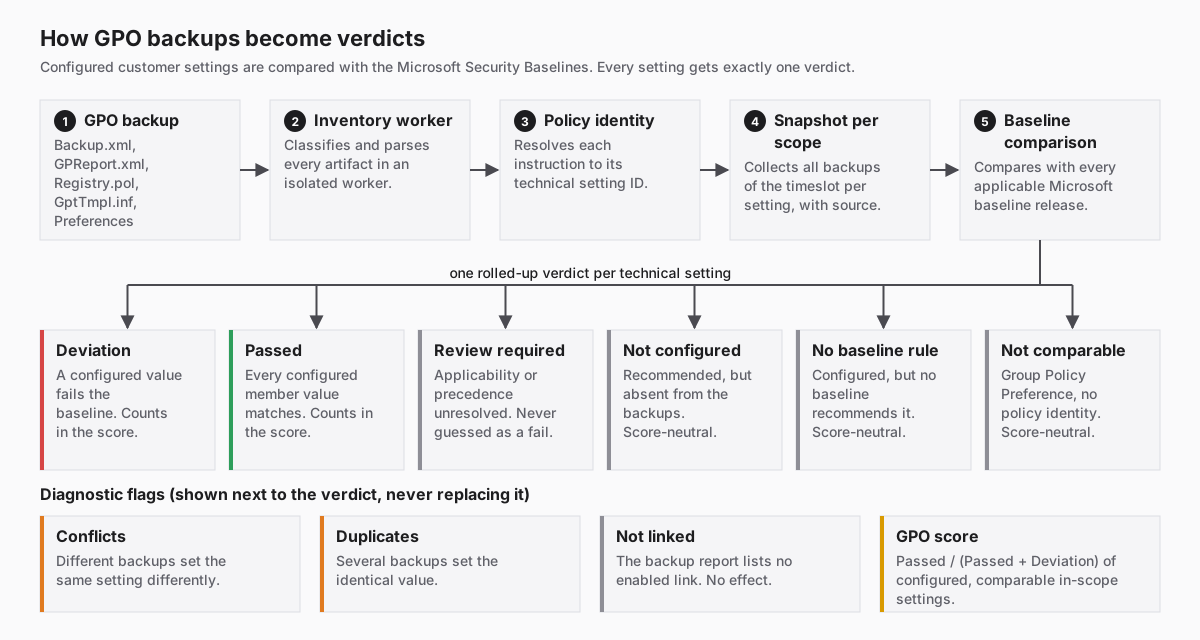
GPO backups are not scanner reports, so they get their own pipeline in
server/gpo/ and src/gpo/:
- A backup folder (uploaded as
.zip) containsBackup.xml,GPReport.xml,Registry.pol,GptTmpl.infand Group Policy Preferences. - An isolated inventory worker classifies and parses every artifact.
- Each instruction is resolved to its technical setting ID (registry value, security template setting, user right, and so on).
- All backups of the timeslot are collected per setting and scope. The source of every value stays attributed.
- The settings are compared with every applicable Microsoft Security Baseline release.
The result is exactly one rolled-up verdict per technical setting:
- Deviation (Fail). At least one comparable, in-scope configured value fails. This counts in the score.
- Passed. Every applicable member value matches. This counts in the score.
- Review required. Applicability or precedence is unresolved. ASSESSOR does not invent a fail.
- Not configured. Recommended by the baseline but absent from the analyzed backups. Score-neutral, and never a remediation obligation by default.
- No baseline rule. Configured, but no baseline recommends it. Score-neutral.
- Not comparable. A Group Policy Preference. Preferences have no policy identity and are never compared with a baseline.
Conflicts and Duplicates are diagnostic flags shown beside the verdict.
They never replace it. Not linked means the backup's own report lists no
enabled link. All of this describes the backup configuration, never the
effective state of a device. Details: GPO_BASELINE_EVALUATION.md.
6. Evaluation: verdicts, scores, security domains
- Scanner outcomes are authoritative. If a scanner says
failorwarning, ASSESSOR shows a finding and does not question it. Normalization maps the tool's words to shared statuses and severities and keeps the original next to them. - Scoring is native-score first (
SCORING_MODEL.md). If the exact file and scan run carry a valid native overall score, that score is used. Otherwise the pass ratepassed / (passed + deviations)is used, where the result population supports one. The two are never mixed for one scan. Not run, error and unknown results do not count as passes. - Security domains. Every check gets exactly one of six domains: Identity &
Authentication, Privileged Access & Delegation, AD Infrastructure & PKI,
System Hardening, Cloud & Collaboration, Monitoring & Recovery. One
classifier (
src/evaluation/security-domains.ts) with per-profile mapping tables serves Work, Client Info and the reports. It reads structured fields only, never the title, prose or outcome. - Comparison between timeslots works on the canonical model and does not
change findings (
COMPARISON_ENGINE.md,TIMESLOT_COMPARISON_PLAN.md). Progress is proven by a rescan, never by a self-reported status.
7. The Core Engine and the optional engines
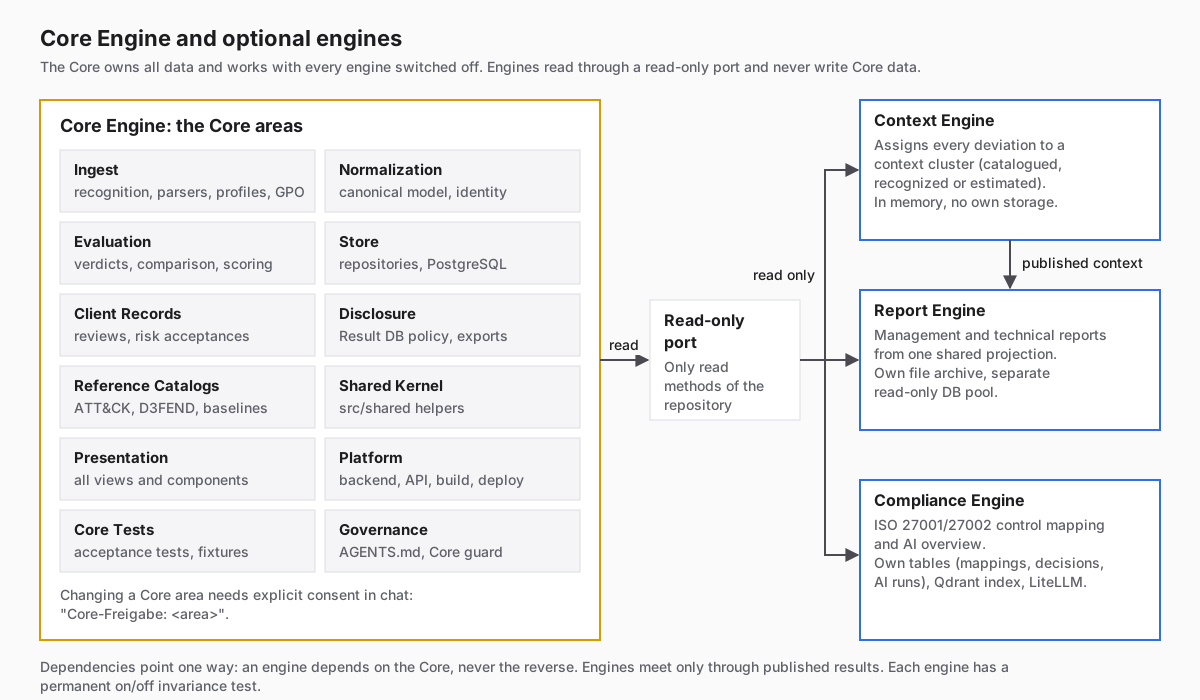
The Core Engine is ASSESSOR with all its existing functions. It is
authoritative, owns all Core data and works unchanged with every engine
switched off. It is divided into Core areas. The exact path map is in
.claude/hooks/core-areas.mjs:
| Area | Typical paths | Responsibility |
|---|---|---|
| Ingest | src/importers, src/recognition, src/profiles, src/gpo, server/gpo, import workers |
getting data in |
| Normalization | src/domain |
canonical model, finding identity, status/severity |
| Evaluation | src/evaluation, src/comparison, src/scoring |
verdicts, comparison, scores, security domains |
| Store | src/persistence, server/postgres |
repositories, PostgreSQL, migrations |
| Client Records | reviews, risk acceptances, review transfer on reimport | client-owned state |
| Disclosure | src/domain/result-db-disclosure.ts, src/exports |
Result DB policy, exports |
| Reference Catalogs | src/references, server/reference-data |
ATT&CK, D3FEND and other catalogs |
| Shared Kernel | src/shared |
shared helpers |
| Presentation | src/app, src/features, src/components, src/styles |
all views |
| Platform | server/, src/api, build, deploy, package.json |
backend, API, product version |
| Core Tests | tests/, fixtures/ |
acceptance tests |
| Governance | AGENTS.md, CLAUDE.md, .claude/hooks |
the rules themselves |
Core consent. A change to a Core area needs explicit consent in the chat
message, for example Core-Freigabe: Evaluation, Store. It applies to that one
message only. Core-Freigabe: alle releases every area except Governance. This
binds every coding agent and every person. For Claude Code a hook enforces it.
Documentation under docs/ is not gated.
The engines
| Engine | Code | What it does | Storage |
|---|---|---|---|
| Context Engine | src/assessment-context/, src/features/context-layer/ |
Gives every deviation a context cluster, in a fixed order of tiers: catalogued (catalogue rule, CIS section, declared ATT&CK technique), recognized (distinctive terms, technical anchors) or estimated (local TF-IDF similarity, category fallback). Deterministic, no AI. Shown as badges, the Context Cluster facet, the Finding Reader section and the Client Info heatmap. A context statement says "favours", never "exploitable". |
none (in memory) |
| Report Engine | src/reporting/, server/reporting/ |
Builds the Management Report (German, offline, no LLM, requires published Context results) and the Technical Report from one shared projection. | own file archive, separate read-only DB pool |
| Compliance Engine | src/compliance/, server/compliance/ |
Maps findings to regulatory controls; ISO/IEC 27001/27002 is the first framework. Owns all AI integration: ISO mapping and the AI overview. | own tables in PostgreSQL, Qdrant index |
Engine rules:
- Engines read the Core only through a declared read-only port. A port is a
Pick<AssessorRepository, ...>that contains read methods only, for exampleComplianceReadPortinsrc/compliance/compliance-store.ts. They never import Core internals or touch Core tables. - Dependencies point one way: an engine depends on the Core, never the reverse. Engines do not import each other. They meet only through published results, for example the Context publication that the Management Report consumes.
- An engine never writes Core data and cannot create findings. New scanners, parsers and importers are always Core changes.
- An engine that needs storage gets its own tables after separate approval, with backup and migration. It never adds columns to Core tables.
- Every engine has a permanent on/off invariance test. Work, Client Info, scores and the Result DB must be identical with the engine on and off.
tests/architecture/core-engine-boundary.test.tsenforces the import direction.
8. Which data can be used where
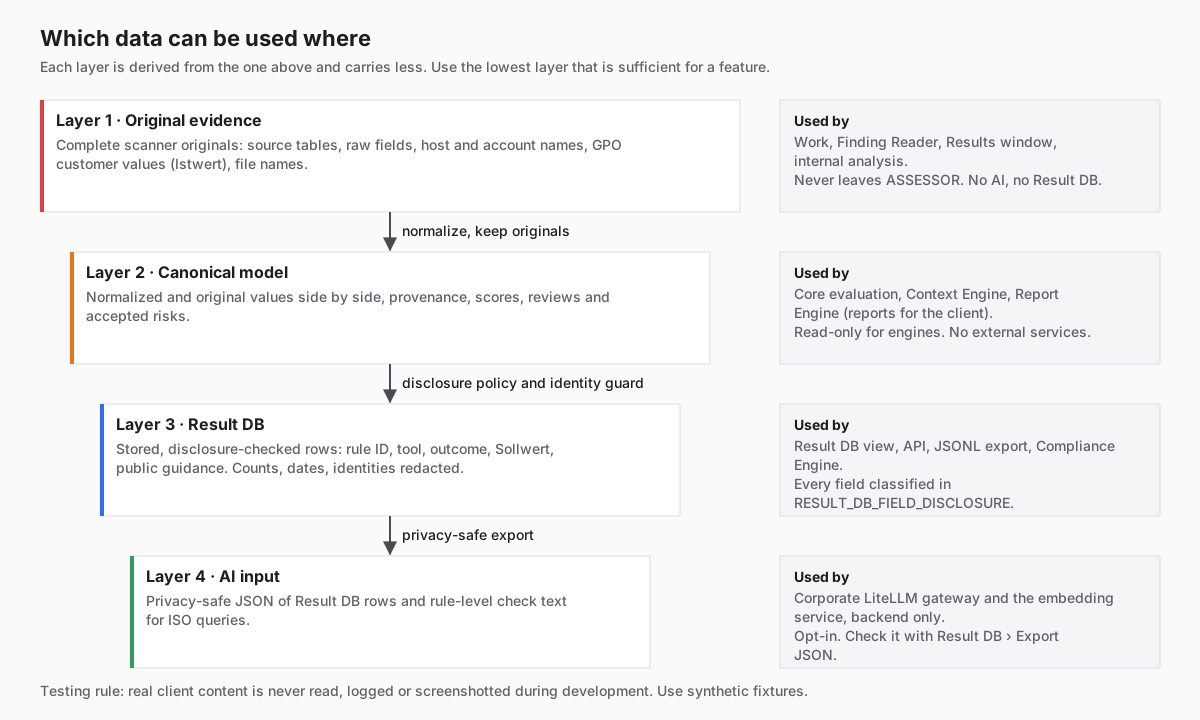
This is the most important section for anyone building a feature. ASSESSOR holds client security data. Each layer below is derived from the one above it and carries less:
| Layer | Contains | May be used by | Must never |
|---|---|---|---|
| 1. Original evidence | Complete scanner originals: source tables, raw fields, host and account names, GPO customer values (Istwert), file names | Work, Finding Reader, Results window, internal analysis | leave ASSESSOR, enter the Result DB, reach an AI service |
| 2. Canonical model | Normalized and original values, provenance, scores, reviews, risk acceptances | Core evaluation; Context and Report Engine through their read-only ports | be written by an engine or sent to an external service |
| 3. Result DB | Materialized, disclosure-checked rows: public rule ID, tool, outcome/severity, Sollwert, comparison relation, baseline family, public scanner guidance | Result DB view, API, JSONL export, Compliance Engine | contain an unclassified field, a client identity or an original value |
| 4. AI input | The privacy-safe JSON of Result DB rows (aiOverviewInputJson) and rule-level check text for ISO queries (buildRegulatoryFindingQuery) |
the corporate LiteLLM gateway and the embedding service, from the backend only | include assets, per-object values or anything from layers 1-2 |
What the Result DB disclosure policy removes (summary; the binding text is in
AGENTS.md under "UI Result DB filter consistency"):
- GPO customer values and every principal in them, GPO source counts and concrete baseline releases (only the family remains);
- client-owned review, priority and risk-acceptance state;
- per-finding scanner scores, versions and functional levels;
- in scanner prose: exact counts, dates, times and durations become
[count],[date],[time]and[duration]; standalone IPv4 addresses, non-public hosts and GUIDs that are not in the public catalog are redacted as well; - ATT&CK/D3FEND references and Pathfinder relations;
- the client's own names, removed by a per-client identity guard.
Every projection field is classified in RESULT_DB_FIELD_DISCLOSURE.
Unclassified fields never cross. Each row carries a content-free trace of
what was withheld. The Result DB view shows that trace and never the original.
Privacy-safe testing. During development, never read, log, quote or screenshot real client content: file names, finding titles, field values, report text. Use synthetic fixtures. Against a real instance, verify only content-free signals such as HTTP status, counts and the presence of an element.
9. AI workflows
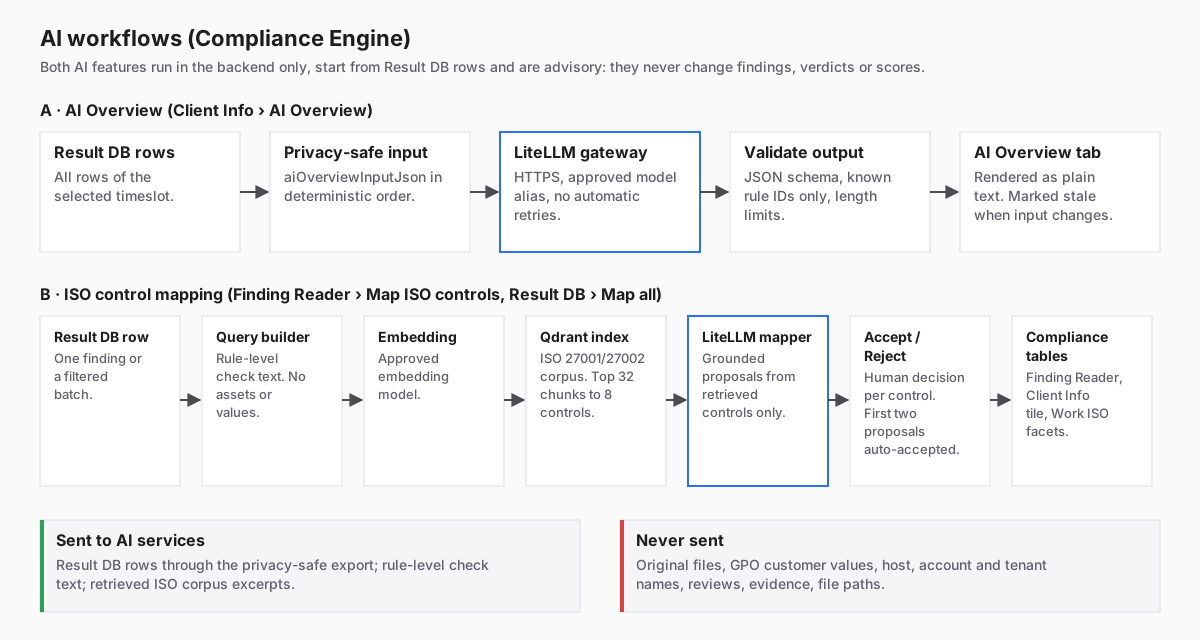
All AI belongs to the Compliance Engine. Both features are opt-in. They run only in the backend and are advisory: they never change a finding, verdict, score, review or risk acceptance.
A. AI Overview (Client Info, AI Overview tab)
- All Result DB rows of the selected timeslot are read through
ComplianceReadPort. aiOverviewInputJson(src/compliance/privacy-safe-export.ts) builds the privacy-safe input in a deterministic order.- The backend sends it to the corporate LiteLLM gateway: HTTPS only, an approved model alias, the key only in the server environment, redirects rejected and no automatic retries.
- The answer is parsed as inert JSON and validated against the output schema and length limits. It may reference only rule IDs and facts that are in the input.
- The result is rendered as plain text. It is marked stale when its input, model or prompt changes.
Security boundary: AI_OVERVIEW_SECURITY.md.
B. ISO control mapping (Finding Reader Map ISO controls, Result DB Map all ISO controls)
- One Result DB row, or a filtered batch.
buildRegulatoryFindingQuerybuilds the query from the rule-level check text only: title, description, technical explanation and recommendation, passed through the privacy boundary. Assets, per-object values and the GPO customer value are never read.- The query is embedded with the approved embedding model.
- Qdrant retrieves candidates from the uploaded ISO 27001/27002 corpus (top 32 chunks, grouped into 8 controls). The index can always be rebuilt from the versioned corpus.
- The LiteLLM mapper proposes controls, grounded only in the retrieved candidates.
- Accept / Reject per control in a window like
Accepted Risk. As a provisional rule, the first two proposals are accepted automatically, and an existing decision is never overridden. - Accepted controls appear in the Finding Reader
ISO controlssection, the Client InfoCompliancetile and the WorkISO control/ISO themefacets. A proposal indicates relevance. It is not proof of compliance.
Details: REGULATORY_RAG.md.
Check exactly what the AI sees
Result DB, then Export JSON, produces a 1:1 copy of what the AI features
receive: the AI overview input built by the same function, plus every distinct
ISO mapping query with the rows that produce it. The retrieved corpus excerpts
are not included because they depend on the index. Use this export whenever
you design or review an AI feature.
Building a new AI workflow
- It belongs in the Compliance Engine, or in a new engine with separate
approval. Never put it in the Core. The shared model client
server/ai/litellm-client.tsis Core platform code you may reuse. - Its input starts from Result DB rows (layer 3) and goes through the privacy-safe export functions. If you need a field that is not there, the answer is a disclosure-policy discussion with the user, not a shortcut to layer 1 or 2.
- Its output is advisory, validated as inert data, stored only in engine-owned tables and rendered as text.
- Its tests use synthetic records and a mocked LiteLLM.
10. Building a new feature: a decision checklist
- Which plan phase? Read
IMPLEMENTATION_PLAN.mdand name the phase. - Core or engine? Does the feature change how data is imported, normalized,
evaluated, stored or displayed? Then it is a Core change and needs
Core-Freigabe: <area>. Does it add a capability that only reads results? Then it is engine work through a read-only port. - Which data layer? Use the lowest layer that is sufficient. Anything that leaves ASSESSOR or reaches an AI service starts at the Result DB.
- Scanner profile work? Declare
securityScoring, keep original values and provenance, add a processing-manifest version and mark affected imports for reimport. - UI? Read
.claude/skills/assessor-ui/SKILL.md. Data Hub, Work and Pathfinder are the visual references. Text sizes are 14px for information and 16px for values and prose. Yellow marks selection, blue marks keyboard focus. No new palettes. - Data flow changed? Remind the user to update the engine diagram in the
Data Flow view (
src/features/db-structure/EngineDataFlow.tsx), and update the diagrams in this guide. - Verify. Run
npm testandnpm run build. Add a synthetic behavioral test for the exact interaction. Bump the product version inpackage.jsononly for a verified release batch.
11. Your first day in the code
npm ci
npm run db:up
npm run dev
Then open http://127.0.0.1:5173. The full setup is in
PROJECT_OVERVIEW.md section 4.
There is one canonical local database. Never create a second one.
Good files to read first, in this order:
| File | Why |
|---|---|
src/domain/ (canonical model types) |
the shape of every finding |
src/profiles/pingcastle/pingcastle-definition.ts |
what a scanner profile declares |
src/recognition/recognition-engine.ts |
how a tool is recognized |
src/persistence/assessor-repository.ts |
the persistence contract every read port picks from |
src/domain/result-db-disclosure.ts |
what may leave ASSESSOR |
src/compliance/compliance-store.ts |
a read-only port example |
src/compliance/privacy-safe-export.ts |
exactly what AI receives |
src/assessment-context/context-engine.ts |
a deterministic engine |
.claude/hooks/core-areas.mjs |
which path belongs to which Core area |
12. Where to read next
| Topic | Document |
|---|---|
| Setup, deployment, configuration | PROJECT_OVERVIEW.md, DEPLOYMENT.md, POSTGRESQL.md |
| Binding rules | AGENTS.md, SECURITY.md |
| Plan and decisions | IMPLEMENTATION_PLAN.md |
| Import | IMPORT_WORKFLOW.md, TOOL_PROFILES.md, REIMPORT_POLICY.md |
| Data model | CANONICAL_MODEL.md, UNIFIED_RESULT_MODEL.md, RESULT_CONTRACT.md |
| Evaluation | SCORING_MODEL.md, GPO_BASELINE_EVALUATION.md |
| Reports | REPORT_STRATEGY.md |
| AI and ISO | AI_OVERVIEW_SECURITY.md, REGULATORY_RAG.md |
About the diagrams: the SVGs in docs/images/onboarding/ are static
documentation images, current as of product version 2.19.1 (2026-10-07). The
live engine diagram in the application is in the Data Flow view, under
Engines & relationships.